RFIDReader

RFIDReader

A Rust-based firmware application for reading and writing ST25TB RFID chips using the LilyGO T-Embed CC1101 device (ESP32-S3 with PN532 NFC module). This tool is particularly useful for interacting with RFID chips commonly found in printer cartridges and other industrial applications.

Key Features

The firmware provides comprehensive functionality for working with ST25TB chips through an intuitive touchscreen interface:

  • Complete Chip Operations: Read entire chip contents (up to 256 blocks) and write modified data back
  • Data Management: Export chip dumps via serial connection and import hex data for writing
  • Interactive Interface: TFT display with rotary encoder navigation for easy menu interaction
  • Audio Feedback: Audible beep confirmation for successful read/write operations
  • Built-in Hex Editor: Modify chip data directly on the device before writing

Technology Stack

The project leverages modern embedded Rust development:

  • Hardware: ESP32-S3 dual-core processor (240MHz) with ST7789V TFT display (170x320)
  • NFC Controller: PN532 module via I2C communication
  • Language: Rust (no_std bare metal programming)
  • Framework: esp-hal hardware abstraction layer
  • Protocol: ISO14443-B standard

Supported Chips

Works with various ST25TB family chips and ISO14443-B compatible devices:

  • ST25TB04K (512 bytes)
  • ST25TB512
  • ST25TB02K
  • Legacy SRI512/SRIX4K models

User Interface

Navigation is designed for quick and efficient operation:

  • Encoder Rotation: Navigate through menu options
  • Encoder Button: Select items or enter edit mode
  • Back Button: Cancel operations or return to previous menu
  • Visual Feedback: Clear on-screen status and confirmation messages

Installation

The project offers flexible deployment options:

  1. Pre-compiled Binaries: Available through GitHub releases
  2. Standalone Installation: Flash directly to address 0x0
  3. Launcher Integration: Deploy via SD card using the Launcher application

Building from Source

cargo build --release
espflash flash target/riscv32imc-esp-espidf/release/rfid-reader

Known Limitations

The developers document some quirks:

  • USB Power Dependency: Device works reliably when serial monitor is connected (known as "Observer Effect")
  • PN532 Initialization: Occasional automatic firmware retry required for proper setup

Use Cases

This tool is valuable for:

  • Printer cartridge chip analysis and modification
  • RFID security research and testing
  • Industrial automation development
  • NFC/RFID prototyping and experimentation

Open Source

Released under the MIT License, the project welcomes community contributions through GitHub. The codebase demonstrates professional embedded Rust development practices and serves as an educational resource for ESP32-S3 and PN532 integration.

FSkatingAcc: When Training Meets Technology

The Problem

Every figure skating trainer knows these situations:

  • You're on the ice, an athlete finishes their skate, and you need to stop the music after the performance. To give specific recommendations to the athlete, not to search for the player to pause it.
  • What if you need to work on a specific element? You can start from a specific second and repeat the element and composition to achieve athlete mastery.
  • Or you need to instantly return to the beginning? Very often the start is missed or not heard, and you have to return to the beginning of the composition.
  • Or queue up the next athlete's music while the current one finishes? Prepare the next accompaniment for the next skate. In advance. So the athlete doesn't wait while you find the right composition in your player.
  • What if you have a training process for "hands" choreography. And the accompaniment needs to be constantly found in the playlist. The queue will always have the accompaniment designated for hands choreography. Now you don't need to search for it every time after other athletes' skates. It will be next in your queue.

Traditional music players just weren't designed for this workflow.

The Solution

That's why I built Figure Skating Accompaniment - a specialized app designed specifically for figure skating training sessions. Our player is more specific and focused only on athletes and figure skating trainers.

Core Features That Matter

Instant Control:

  • Stop and pause buttons to stop the accompaniment
  • One-tap return to track beginning
  • Quick seeking for finding the right moment
  • Auto-switch to the next track after the current one ends, but with a stop, so the athlete has time to get into position
  • Pause and resume without losing your place

Training-Focused Tools:

  • Program markers: Set timestamps for specific elements and jumps
  • Training point mode: Start playback from any marked section, not just the beginning, with repeat of that moment

Professional Workflow:

  • Queue management for multiple athletes
  • Length validation against competitive standards
  • Hands mode: Automatically queue a designated accompaniment when the queue is empty

Music Management:

  • Multiple upload options (Yandex.Disk, phone files, messaging apps)
  • Category selection by competitive level/division
  • Athlete profile management

Why It's Free

I believe quality training tools should be accessible to everyone in the figure skating community. The app is completely free to use, with optional donations supporting ongoing development and new features.

Built for the Ice

Every feature was designed with real training scenarios in mind. Whether you're working with a single athlete perfecting a jump sequence, or managing a busy session with multiple skaters, FSkatingAcc adapts to your workflow.

The interface is optimized for quick actions and minimal distraction - because when you're coaching, your focus should be on the ice, not on the technology.

Try It Out

Ready to streamline your training sessions? Check out FSkatingAcc and see how it fits into your coaching routine.

Have suggestions or feedback? I'm always looking to improve the app based on real trainer and athlete needs.


P.S. If you find FSkatingAcc helpful, consider sharing it with other coaches and trainers in your community. The more feedback I get, the better the app becomes for everyone.

Forge: When Developers Become Managers (with AI Cats as Assistants)

From Unemployment to Discovery

I'm currently between jobs, vibing with code non-stop. And here's what I noticed: developers won't become extinct, they just don't need managers anymore. Developers ARE the managers now, with AI cats as their assistants.

With this thought, I went googling for solutions, because ideas always come to me last in the world and someone has probably already started a project and is making money from it.

The Path to Discovery

I stumbled upon auto-claude. A system that allows you to run agents separately in each worktree so they can solve tasks independently from each other. And of course, they preserve context.

I thought: "This is it! Exactly what I need!"

But I decided not to stop there. I went to Grok and said: "Scan the market, are there better solutions?" And guess what? It actually found some!

Meet Forge

The folks at Automagik were inspired by the vibe-kanban idea (and this project is much more convenient than auto-claude and less buggy). They integrated their Genie into this fork — a fine-tuned AI that transforms human language into proper tasks.

What Makes Forge Special?

  1. Isolated worktrees for each task — agents work independently without interfering with each other
  2. Genie integration — transforms your vague thoughts into clear tasks
  3. Kanban board out of the box — visual task management
  4. Support for multiple AI models — Claude, GPT, Gemini, and others
  5. Automatic branch management — creation, switching, merging — all automatic
  6. Context is never lost — each agent remembers what it was doing

Why This Matters?

The old chain was: manager → developer → code. Now it's: developer → AI agent → code.

The manager transforms into a developer with good communication skills. And the developer transforms into an architect who manages an army of AI cats.

My Experience

In just a few days with Forge, I:

  • Set up a task management system
  • Launched 5 agents in parallel on different features
  • Never lost context once
  • Got working code without micromanagement

This doesn't mean you can relax completely. But it does mean you can now think about business logic instead of routine tasks.

The Bottom Line

Folks, this is straight fire.

Check it out: github.com/automagik-dev/forge

If you're a developer tired of context-switching between tasks, or a manager who wants to be closer to the code — try Forge. It might be the thing that changes your workflow forever.


P.S. This post was written with the help of AI, which is itself managed through Forge. Meta, right?

P.P.S. Oh you piece of sht! Did you think I wouldn't read what you wrote here?*

Restore blobs from git

Problem

Often thoughts come faster than actions, and once again I fell into this situation where I added files to the stage but forgot to commit, and immediately ran off to jump through commits using git reset and git checkout.

For those who are not yet familiar with this problem, git reflog won't help here. If you haven't done git add ., your last hope to recover files is only through:

  • Time Machine
  • Local changes if you're working in a JetBrains IDE
  • Or if you're good at recovering data from an SSD
  • etc

Solution

The solution is available if you did git add .. This means Git has stored the blobs in its database but hasn't linked them to a specific commit. We can view these blobs:

git fsck --full --unreachable --no-reflog

This command will return all unstructured blobs that have no index.

We can examine each of them individually.

git cat-file -p <hash>

and save them to some file:

git cat-file -p <hash> > file.txt

But, as you've already guessed, this is not very convenient.

Tooling

Let's create a more convenient script that does all this for us.


# Create a folder for recovered files
mkdir -p restored_blobs

# Find all dangling blobs and recover them
echo "Searching for lost files..."

# git fsck finds lost objects
# grep "dangling blob" filters only files (ignoring lost trees/commits)
# awk '{print $3}' extracts the hash
for blob in $(git fsck --lost-found | grep "dangling blob" | awk '{print $3}'); do
    echo "Recovering: $blob"
    git cat-file -p $blob > restored_blobs/$blob
done

echo "Done! Check the restored_blobs folder."

That's all. Now we just need to go through the files, figure out what's what, and put them where they originally were. Since the paths where they were located are not preserved, we'll have to do this manually.

Conclusions

I hope this saves someone's life, because it has saved mine many times.

NetMonRS

Net Monitor Rust

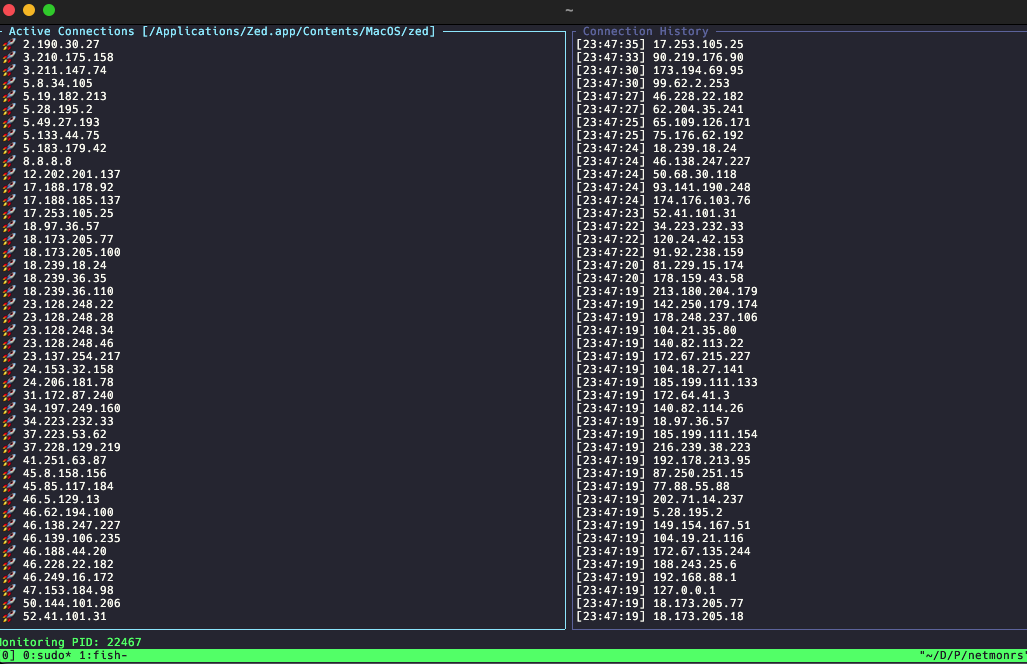
NetRS is a network monitoring tool written in Rust that shows real-time network connections using the Ratatui library for terminal-based user interface. The application lets users monitor active network connections and view connection details including local and remote addresses, protocols, and connection states. Users can filter connections based on different criteria. The tool uses the system's networking features to collect connection information and displays it in an interactive, easy-to-use terminal interface. This tool helps system administrators, network engineers, and developers quickly check network activity on their systems directly from the command line.

This offers a more efficient way to monitor outgoing connections from a specific process.

I developed this tool for the WireDeskVR project to check agent connection status.

It can also be used for other purposes. For example, to find where a specific process connects on your computer.

Example Usage

sudo netmonrs /Applications/Zed.app/Contents/MacOS/zed

We need sudo access for lsof.

How it looks

NetMonRS Interface

Controls

  • Tab - Switch focus between active connections and history
  • Up / k - Move up in list
  • Down / j - Move down in list
  • PageUp / Ctrl+u - Page up
  • PageDown / Ctrl+d - Page down
  • q - Quit application

WireDeskVR

Objective

The initial stage and first step involve creating screen capture functionality for the agent, enabling it to broadcast, transcode, and transmit the captured content over a network.

Project

First, we create a dedicated project to explore the possibilities. Since this is an agent, it will run on macOS as a service or background daemon. Its primary task is straightforward—since it has no UI, we will implement it using Swift and Swift Package Manager as a standard executable.

Source Code

The core function of the agent initializes a socket for each detected display. We will observe how this functionality performs.


    func start() async throws {
        let sender = NetworkSender(host: "127.0.0.1", port: port); sender.start(); self.network = sender

        let content = try await SCShareableContent.current
        guard let display = content.displays.first(where: { $0.displayID == displayID }) else { return }

        let encoder = VideoEncoder(width: display.width, height: display.height, bitrate: 20_000_000)
        encoder.delegate = self; self.encoder = encoder

        let captureSession = ScreenCapture(displayID: displayID)
        captureSession.delegate = self
        self.capture = captureSession

        try await captureSession.start()
    }

Automating Project Workflows with YouTrack JavaScript Rules

Introduction

JetBrains YouTrack provides a powerful workflow engine that allows teams to automate and enforce project management policies using JavaScript. Unlike simple status transitions, YouTrack workflows can validate data, enforce business rules, and ensure consistency across your development process.

This article explores practical workflow automation through three real-world examples: validating test environment deployments, enforcing time tracking, and ensuring task estimation. These patterns are applicable to any team using YouTrack for agile development.

Why Workflow Automation?

Manual enforcement of project policies is error-prone and time-consuming. Common problems include:

  • Incomplete time tracking: Developers forget to log spent time
  • Missing estimations: Tasks move to "In Progress" without effort estimates
  • Incorrect state transitions: Test builds deployed to production accidentally
  • Inconsistent processes: Different team members follow different workflows

YouTrack's JavaScript-based workflows solve these problems by:

  1. Preventing invalid transitions: Block state changes that violate policies
  2. Enforcing required fields: Ensure critical data is captured
  3. Validating business logic: Implement complex rules programmatically
  4. Providing immediate feedback: Show clear error messages to users
Read more  ↩︎

Building a Localization Sync Tool for iOS/macOS

Introduction

Managing localization files in iOS and macOS projects can become challenging as your app grows. When you add new strings to your base language file, keeping all translation files synchronized becomes tedious and error-prone. This article explores syncLproj, a Rust-based CLI tool designed to automate this synchronization process.

The Localization Problem

In iOS/macOS development, localization uses .strings files with a simple key-value format:

/* User interface strings */
"welcome_message" = "Welcome to our app!";
"login_button" = "Log In";
"signup_button" = "Sign Up";

When managing multiple languages, several problems emerge:

  • Missing keys: New keys added to the base language don't automatically appear in translations
  • Key order inconsistency: Different files have keys in different orders, making diffs harder to review
  • Orphaned keys: Removed keys remain in translation files
  • Manual work: Copy-pasting keys across dozens of files is time-consuming and error-prone

Traditional approaches involve manual editing or Xcode's built-in tools, which lack automation capabilities for CI/CD pipelines.

Read more  ↩︎

Building a Terminal File Manager with Rust

Introduction

This post explores the journey of building a terminal user interface (TUI) file manager in Rust. We'll examine Blaze Ultra, a practical CLI application that demonstrates key concepts in Rust development including terminal manipulation, event handling, and modern UI frameworks.

Why Rust for CLI Applications?

Rust has become increasingly popular for CLI tools due to several compelling advantages:

  • Performance: Near C-level performance with zero-cost abstractions
  • Safety: Memory safety without garbage collection prevents common bugs
  • Ergonomics: Modern tooling with Cargo makes distribution trivial
  • Cross-platform: Write once, compile anywhere with minimal platform-specific code
  • Rich Ecosystem: Mature crates like clap, ratatui, and tokio accelerate development

Popular examples include ripgrep, fd, bat, and exa - all demonstrating Rust's capability to create fast, reliable command-line tools.

Read more  ↩︎

WireDeskVR

Project Description

WireDeskVR is a VR application that allows users to work with the WireDesk interface in virtual reality. The project implements a full virtual workspace environment with the ability to interact with UI elements via gestures and controllers. At this stage, it is a proof of concept to see how technically feasible it is. Competitors and ideas circulating in the community have also been studied. There will be a lot of research and we will encounter many first-time challenges.

Technologies

  • Swift
  • ARKit / RealityKit
  • Metal
  • Core Motion
  • SceneKit
  • UnrealEngine
  • Android
  • Oculus/Meta Quest

Features

  • 3D interaction with the interface
  • Support for various controller types
  • Integration with the WireDesk API
  • Performance optimization for VR devices

I have had a long-standing dream since childhood to create a virtual desktop for working with a computer. Today, technology not only allows us to achieve that but also to implement it with artificial intelligence. This project is more of a test to understand how capable technology is today in helping achieve this goal. The main idea of the first stage is to create NoLatency, transmitting video data from MacBook screens to Oculus Quest. In subsequent stages, we plan to introduce a plugin system and our own binary protocol to unify data from other applications and other users in VR.

Roadmap

  1. Establish a stable connection and configure workstations.
  2. Examine and analyze the free space on the computer's resources, as well as on the Opulus system. If resources allow managing screens, also consider creating a gaming zone within virtual reality to let users relieve emotional load by dividing something in VR.
  3. Screen sharing and the social component did not take off and are not popular among competitors, so we omit this part. At the third stage, we immediately move to beta testing of the binary protocol for transmitting custom data from macOS and the host to VR headsets.
  4. Systematize and standardize the protocol, and also start developing a marketplace for users.
  5. Capture the world and find someone to sell it to.