VRDesktopUltra: four Mac screens in VR — and text without shimmer
The most satisfying result from our recent VRDesktopUltra experiments was a short message after another headset check: “Hooray, the shimmer is gone!”
Behind it were several iterations of image transport, a different way of presenting virtual monitors, and measurements that made us reconsider some early decisions. Our test setup now runs three virtual ultrawide Mac screens alongside the main Retina display, together in a single VR scene on Quest Pro.
VRDesktopUltra grew out of WireDeskVR, our earlier virtual workspace project built with Unreal Engine 5. The goal remains the same — comfortable Mac screens in VR — but the new implementation replaces UE5 with our own Rust and OpenXR stack.
Here is where the system stands as of October 21, 2026: the architecture we chose, why we chose it, and the boundary between a working experiment and an everyday tool.
We need a workspace, not just a large video
Displaying a computer image in a headset is only the beginning. When watching a movie, a small loss of detail might go unnoticed. With a code editor, terminal, or pixel artwork in front of you, the requirements are different: thin lines should not shimmer when you move your head, small text should remain legible, and scrolling should feel responsive.
We also want more than one rectangle attached to our gaze. We want a workspace: arrange screens around us, adjust their distance, size, and curvature, and move between them.
That leads to the first important decision: the Mac sends monitor content; Quest builds and presents the VR scene locally. Head tracking, controllers, and screen geometry are handled on the headset. Turning your head does not require waiting for the computer to render and transmit a new image of the entire virtual world. The last received desktop image stays in place while its next update is still in transit.
The core logic is written in Rust. On the Mac, we use ScreenCaptureKit, Metal, and hardware VideoToolbox; on Quest, OpenXR, OpenGL ES, and hardware decoding. Our protocol runs over a USB NCM network connection. The current path is wired, with no Wi-Fi fallback.
Why one transport method was not enough
We tested two approaches to desktop images.
Send changes losslessly. The Mac compares the image against the acknowledged version on the GPU, identifies changed 128 × 128 pixel tiles, and sends only those tiles. If LZ4 makes a tile smaller, we compress it; otherwise, we send the raw data. An unchanged image needs no new batch.
That is useful for text and small edits. But scrolling changes pixels across almost the entire screen. In that case, “send only changes” does not mean “send little data.” Early measurements with three screens scrolling simultaneously exposed the cost of packing and transmitting large batches.
Send motion through a hardware video codec. This reduces the data volume for large, continuous changes, but adds encoding and decoding work, along with quality loss.
We chose an adaptive path, rather than one universal mode:
- small changes travel as lossless tiles;
- sustained large changes switch to hardware HEVC;
- once motion stops, a complete lossless update restores an exact baseline for subsequent changes.
In video mode, every transmitted frame is independent: we use IDR images without a chain of predictive frames. That simplifies recovery, but costs bandwidth and encoder work. We measure that trade-off rather than treating it as free.
Consistency matters too. Quest publishes a completely prepared image instead of displaying a half-updated monitor. It acknowledges the update only after the corresponding GPU work completes. Exact updates cannot be applied on top of an approximate video image without first restoring the baseline.
The main visual change: separate monitor layers
One of the most noticeable problems was not in the cable: small text shimmered during head movement.
We changed how it is presented. Instead of always drawing the front faces of monitors into the general 3D scene image for each eye, we submit them as separate spatial layers to the Quest compositor. Flat screens use quads; circularly curved screens use cylinders. The scene remains local and immersive — the screens do not become system-menu panels.
This separates monitor content from rasterization of the overall scene view. A static image is not copied again with every head movement either: it only needs updating after a new version arrives.
We tested three curved monitors through this implementation while wearing the headset. That was when we received confirmation: the shimmer was gone. We froze that version as the visual baseline for further work.
This is the result of a particular check, not a promise of perfect readability for every font at every angle. But it matters more than another successful launch: the image actually felt different.
The main Mac display is now part of the space
Our current setup has three virtual monitors at 5760 × 1200 each, plus the main 4112 × 2658 Retina display. After restoring the USB session, we verified updates from all four sources and submission of four monitor layers in an active VR session.
The virtual screens run at native 1×: desktop, capture, and transmitted image dimensions match. The main screen is captured at its real backing resolution, rather than the smaller logical size reported by macOS. We do not change the physical display mode.
Retina revealed an instructive detail: a hardware decoder may allocate an image slightly taller than the visible content. Our source is 2658 pixels high, while the coded surface is 2672 pixels high. We now read the decoder's actual crop and validate it against the original screen. Technical padding must not stretch or trim the desktop.
Controllers can move and tilt monitors and adjust their size, depth, and curvature. We also fixed accumulated vertical offset during tracking-space changes after removing and putting on the headset. Full testing of interaction combinations and repeated session entry is still ongoing.
Removing an unnecessary wait on the receiver
Improving the image did not automatically eliminate latency. The next experiment exposed an unnecessary dependency: a ready image was waiting for the next XR-loop iteration before it could be published for presentation.
We separated waiting for the next XR frame from servicing ready images. While the runtime waits for its next frame, the main graphics thread can advance uploads and check GPU completion. Integrity checks and application acknowledgements remain intact — an early “done” is not a valid optimization.
In a matched 18-second experiment, content moved on one screen while the other two stayed static. The server, USB transport, codec, resolution, and monitor layout remained unchanged between runs; both measurements took place with the headset active.
We measured the receiver-side interval from submitting an image for decoding to publishing the completed image.
| Metric | Before | After |
|---|---|---|
| Mean | 29.14 ms | 13.70 ms |
| 95th percentile | 29.29 ms | 17.73 ms |
This is not the latency from a change on the Mac to light through the lenses. The table excludes capture and encoding on the computer, transport before receiver submission, and subsequent display output. The end-to-end target of less than 20 ms remains open. What this A/B demonstrates is a specific wait removed without reducing resolution or changing the visual baseline.
Testing more than a quiet desktop
For the next stage, we built a fullscreen Metal workload across all connected displays: colorful geometry, fine detail, movement, zooming, rotation, and scene changes. The image includes a source-frame counter and elapsed time, making it easier to distinguish scene motion from the actual arrival of new frames.
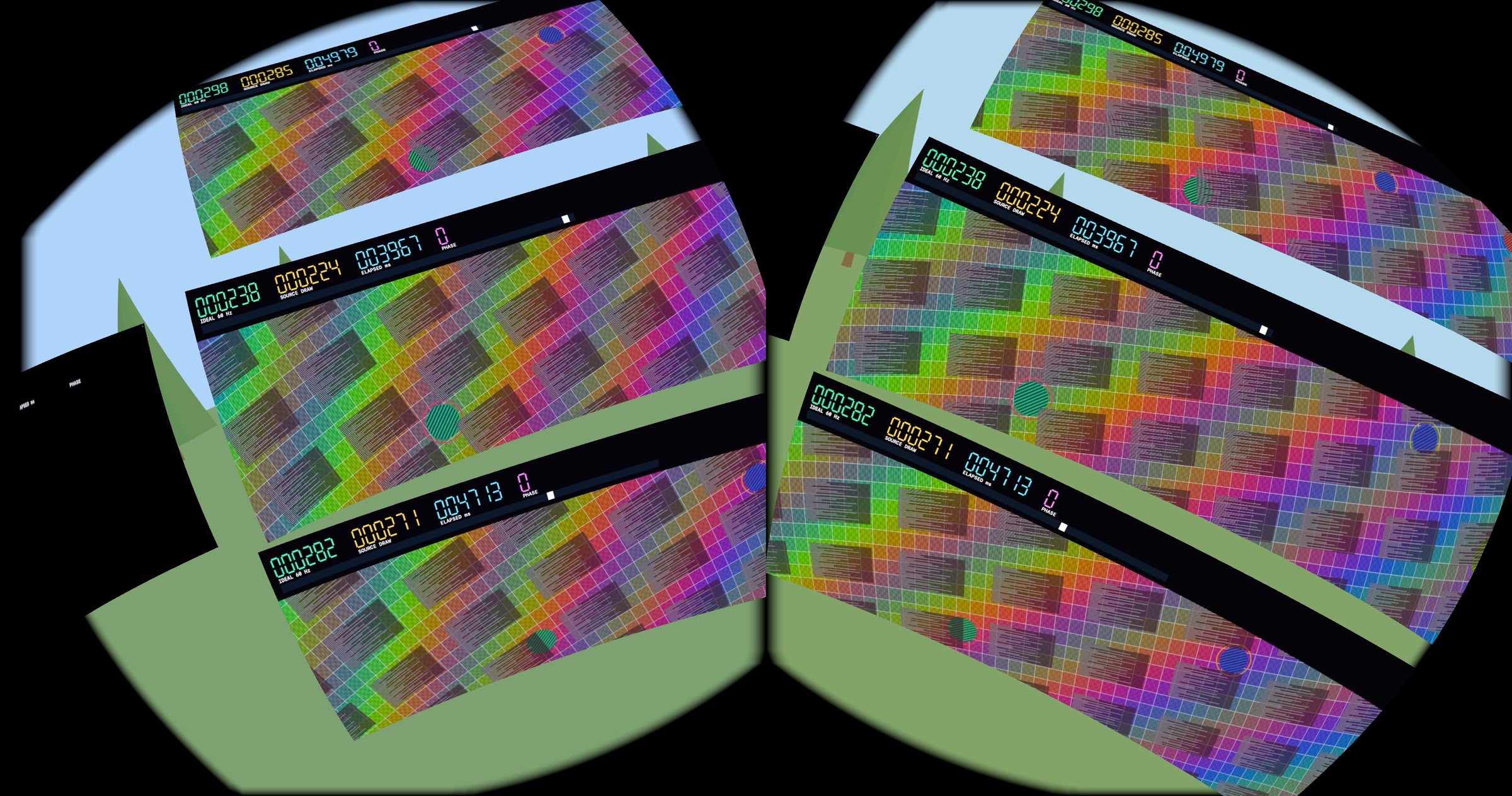
The VR test pattern: a colorful grid, fine detail, and moving elements, with source-frame and time counters along the top. This is a stereo headset capture, not a through-the-lens photograph or an optical latency measurement.
A 30-second Mac run produced about 59.8 completed GPU frames per second on each of the four sources. This validates the workload generator, not the same video rate on Quest: the headset was asleep during that run. A matched check of the entire chain with the headset worn is still ahead.
We have also installed an experimental build that requests spatial supersampling for monitor layers and changes receive servicing under dense traffic. We are not claiming new visual or speed results from those changes yet: they need a live A/B against the accepted baseline first.
What we are not promising yet
The project is not yet an everyday tool without caveats. End-to-end latency measurements, sustained load with memory and thermal monitoring, reconnect testing, and a stable video rate across all screens remain ahead.
Another critical use case is pixel art. Preserving source resolution is not enough: the current HEVC motion path uses lossy compression and chroma subsampling. A later lossless refresh does not guarantee accuracy during editing. We therefore do not claim full pixel-perfect transmission while drawing. Nor does one source pixel automatically become one physical headset pixel at an arbitrary virtual monitor size and position.
But the direction is settled: a local VR scene, separate monitor layers, and adaptive content transport over USB. We have a working four-screen configuration, confirmed disappearance of shimmer on the chosen visual baseline, and a measurable reduction in one part of the latency pipeline. The next task is to preserve that quality while making the whole system consistently responsive — not just individual stages.